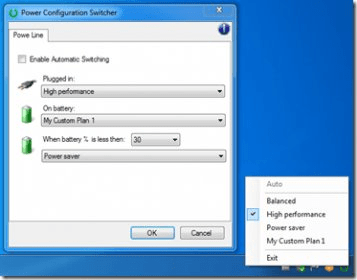
This utility provides a simple way to switch between Power Plan Schemes quickly. It is developed using C# and Visual Studio 2010 (WinForm). Features include: displaying the active power plan in the system tray with an icon and a tool tip, right-clicking the icon to view and change available plans, listing all plans including user-defined ones, automatically updating status even when the plan is changed externally, and managing power scheme depending on the power line AC/battery.
This is a very simple utility that exposes an icon in the system tray and allows you to quickly change the Power Plan Scheme from there.
It is developed in c# with Vs 2010(WinForm).
Features:
- Shows the active power plan with an icon and a tool tip in the system try
- Right click the icon to get the list of available plans and change it
- Lists all plans even the user defined ones
- Always updates status even when the plan is changed externally
- The list is always updated with latest additions/removals
- Automatic management of power scheme depending on the power line AC/battery
- Set a plan when Battery Life % is less then a value




Comments